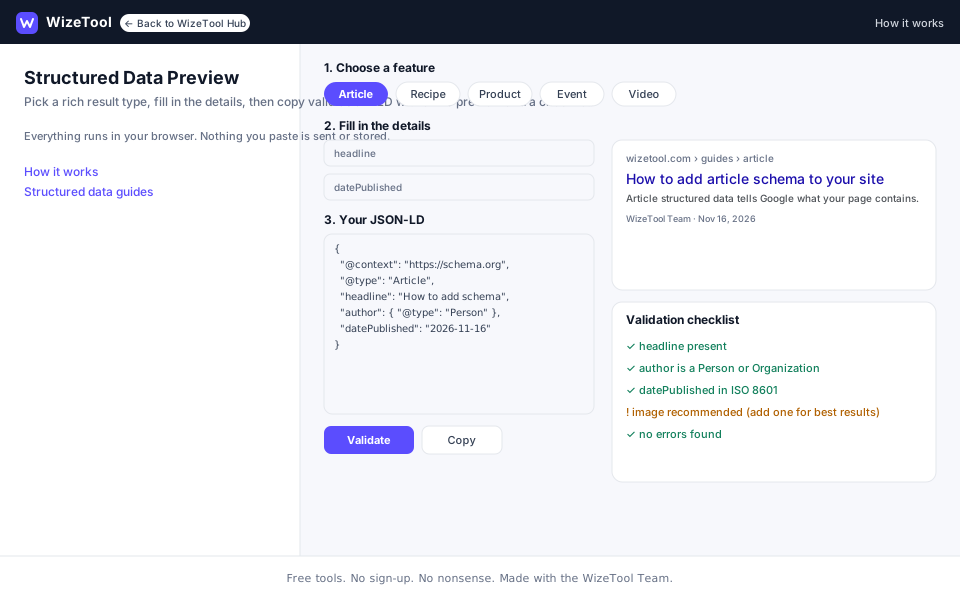
Short answer: Structured Data Preview builds and validates JSON-LD schema markup and shows a live preview of the rich result it may produce. Paste existing JSON-LD or fill in fields for common types such as Article, Product, FAQPage, BreadcrumbList and Organization, then copy the snippet into your page. Free, no account, no trial, no paywall, and the markup stays in your browser.
Structured data is how you describe a page in a format machines can read. Google uses it to understand what a page is about and, for supported types, to show richer results: a product with a price and rating, an FAQ with expandable questions, a breadcrumb trail, an article with an author and date. The Structured Data Preview tool gives you one place to write that markup, check it and see roughly how it may look before you publish. It is a helper, not a guarantee: only Google decides which results to show.
About this tool
The WizeTool Structured Data Preview is a free, no-sign-up editor for JSON-LD, the most common format for schema.org markup. JSON-LD goes in a <script type="application/ld+json"> block in your page and describes the page's content using a shared vocabulary of types and properties. Google reads it alongside the visible page.
You can work in two directions. Paste JSON-LD you already have and the tool checks it, or pick a type and fill in the fields and the tool assembles the JSON-LD for you. As you type, a validation panel flags missing recommended properties and a preview panel shows how the markup may appear in a search result.
How it works: the checks run in your browser. The tool parses your JSON, looks at the @type and its properties, and compares them with the fields Google commonly expects for that type. The preview is an approximation built from the values you entered.
Limits: the tool checks syntax and common properties, not every rule in Google's structured data documentation. It does not crawl your page, so it cannot confirm that the markup matches what a visitor sees. It does not submit anything to Google and it cannot promise a rich result. Google's own Rich Results Test and the enhancement reports in Search Console remain the authority.
What it does
- Builds JSON-LD from fields for common types such as Article, Product, FAQPage, BreadcrumbList and Organization.
- Accepts pasted JSON-LD and checks it for syntax errors, such as a missing comma or an unclosed brace.
- Flags missing recommended properties for the detected type, for example an Article image or a Product offer.
- Shows a live preview of the rich result, including title, description, rating and price where those fields exist.
- Explains each warning in plain language so you know what to add or change.
- Produces a copy-ready JSON-LD snippet to paste into your page.
How to use it
- Open the Structured Data Preview. It works on desktop and mobile and needs no account.
- Choose "Paste JSON-LD" to check markup you already have, or pick a type and fill in the fields to build new markup.
- Watch the validation panel as you type. Red errors mean the JSON cannot be parsed; amber warnings mean a recommended property is missing.
- Check the preview panel to see roughly how the result may look. Fix the warnings that matter for your page.
- Copy the JSON-LD snippet into the
<head>of the page it describes, then verify it with Google's Rich Results Test and Search Console.
What it can and can't do
Can:
- Build valid JSON-LD for common, Google-supported types from fields.
- Parse pasted JSON-LD and report syntax errors with the line or property involved.
- Warn when recommended properties are missing for the detected type.
- Show an approximate rich result preview from the values you provide.
- Produce a snippet you can copy straight into a page.
Can't:
- Guarantee that Google will show a rich result. Eligibility and ranking are Google's decision.
- Replace Google's Rich Results Test or the Search Console enhancement reports.
- Confirm that the markup matches the visible content of your page. That check is yours.
- Cover every schema.org type or every property Google supports.
- Publish or submit the markup for you. You add it to your site.
Privacy
The tool runs in your browser. The JSON-LD you paste or build is not uploaded to WizeTool and is not stored. There is no account, no trial and no history to manage. See the Privacy Policy for details on what the site does collect.
Worked example
Imagine you have published a product page for a £49 course and you want it to be eligible for a rich result with a price and rating. You choose the Product type in Structured Data Preview and fill in the name, description, image, price, currency and rating. The preview panel shows a result with the product name, the price and a five-star line. One warning remains: the tool suggests adding an availability value, so you add InStock. The JSON-LD now passes with no warnings, and you copy it into the page's <head>. You then paste the live URL into Google's Rich Results Test, which confirms that the markup is eligible for the product snippet. Nothing in this process guarantees that Google will show the result, but the markup is valid, complete for its type and matches the page.
Frequently asked questions
Is Structured Data Preview free?
Yes. It is free to use, needs no account and has no trial or paywall.
Do I need to know JSON-LD to use it?
No. You can fill in fields and let the tool build the JSON-LD for you. If you already have JSON-LD, paste it in and the tool checks it and explains any problems.
Does valid markup guarantee a rich result?
No. Valid markup makes a page eligible for supported rich results, but Google decides whether to show them. Content quality, the query and Google's own tests all play a part.
Does the tool store my markup?
No. The checks run in your browser and the JSON-LD you paste or build is not uploaded or stored. See the Privacy Policy for details.
Should I use this instead of Google's Rich Results Test?
Use both. Structured Data Preview is for writing, checking and previewing markup as you work. Google's Rich Results Test and Search Console are the authoritative checks for eligibility and for finding issues on your live pages.
Related guides
- Article Structured Data: JSON-LD Guide with Live Preview — how to mark up a blog post or news article, with a full example.
- Breadcrumb Structured Data — how to describe the path to a page so Google can show it in results.
- Event Structured Data — dates, location and ticket fields for events.
- Local Business Structured Data — name, address, opening hours and ratings for a local page.
- How to Get Cited by AI Search Engines — includes a step on adding accurate structured data that matches the page.
- On-Page SEO Checklist: 12 Practical Checks — see the section on using structured data only when it fits.
Ready to check your content?
Open the app to review your content and get clear, prioritized findings.