Breadcrumb Structured Data: JSON-LD Guide
Want to replace that ugly raw URL under your search result? Breadcrumb structured data swaps it for a clean trail like Home > Guides > SEO. Add the BreadcrumbList JSON-LD, check it with the free Structured Data Preview tool, and confirm it in Google's Breadcrumb documentation.

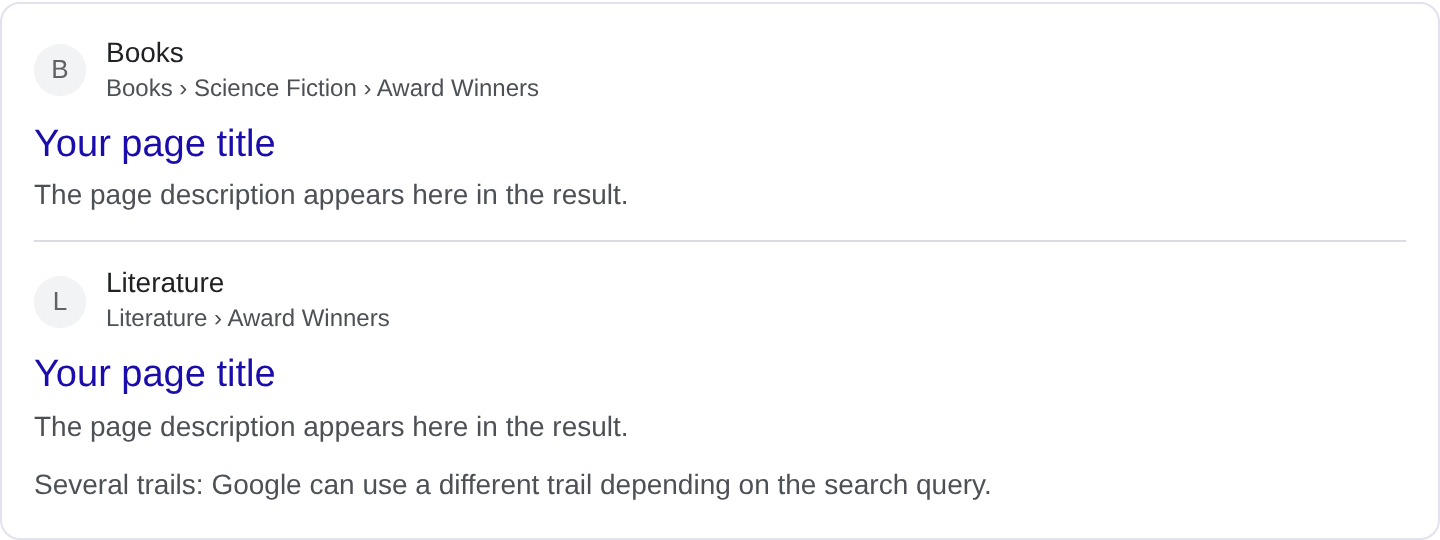
What is Breadcrumb structured data?
Breadcrumbs are the small trail of links near the top of a page that shows where you are in a site's hierarchy: Home, then Category, then Subcategory, then the page itself. Without markup, Google guesses that path from your URL, and the guess is often wrong or ugly. Breadcrumb markup gives Google the exact sequence you want shown in the search result URL line. Instead of a raw domain and a slug, the result reads example.com > Guides > SEO. For the exact property requirements and examples, see Google's Breadcrumb structured data documentation.
The reason this matters is that the URL line is one of the first things a searcher scans. A clean, readable path signals structure and makes the destination obvious before the click. It also helps Google understand how your pages relate to each other, which feeds into how it groups and ranks content. Breadcrumb markup is one of the few structured data types where Google shows the enriched result almost everywhere, so the payoff is consistent rather than experimental.
You mark up a BreadcrumbList, which is an ordered list of items. Each item has a position and a name, and the last item links to the current page. The trail should mirror the visible breadcrumb on the page, not an invented hierarchy. If a visitor can see "Home > Tools > SEO" at the top, that is what your markup should describe.
What it looks like in search results
The enriched result replaces the plain URL beneath your title with a compact path, typically shown as site.com > section > page. On mobile the trail can collapse to the last couple of segments if it gets long. Google's presentation shifts between tests and device types, so the exact rendering may differ from any example you have seen. Check your own result in the Rich Results Test, and use the Structured Data Preview tool to confirm the list you intend to publish.
JSON-LD example
{
  "@context": "https://schema.org",
  "@type": "BreadcrumbList",
  "itemListElement": [
    {
      "@type": "ListItem",
      "position": 1,
      "name": "Home",
      "item": "https://example.com/"
    },
    {
      "@type": "ListItem",
      "position": 2,
      "name": "Guides",
      "item": "https://example.com/guides/"
    },
    {
      "@type": "ListItem",
      "position": 3,
      "name": "SEO",
      "item": "https://example.com/guides/seo/"
    }
  ]
}
Each ListItem needs a position that starts at 1 and increases by one, and a name that matches the visible link text. The item is the absolute URL of that level. The last entry is the page the markup lives on, so its item should be that page's canonical URL. If a level is the current page, you can still include the item or leave it out, but be consistent across your site. Never skip a position, and never start the list at 0.
Required and recommended properties
The required pieces are position and name for each item, plus item for every entry except possibly the last one. Without a correct position sequence Google cannot trust the order. The name is what shows in the trail, so it should be short and descriptive. The item URL is recommended for all levels and essential for the first two or three so Google can resolve the path.
There is no separate recommended list; the value is in accuracy. Keep the trail to the real hierarchy, use the same labels as the visible breadcrumb, and make sure every URL resolves without a redirect. A breadcrumb that points to a page that redirects somewhere else sends mixed signals and can cause Google to drop the enriched path.
How to add Breadcrumb markup to your page
1) Use the validator and choose the BreadcrumbList type so the fields are laid out for you. 2) Fill in each level with the same text and URLs as the visible breadcrumb, starting the position at 1. 3) Fix any errors the preview flags, usually a missing position or a relative URL. 4) Paste the JSON-LD into the page <head> so it loads with the content. 5) Test the live URL in the Rich Results Test and confirm Google reports a valid BreadcrumbList with the expected number of items.
Common mistakes to avoid
Using the page title as the last item instead of the section name. The last crumb should usually describe the page, but the trail above it should describe sections. Mixing the two makes a confusing path.
Positions that do not start at 1. If your first item is position 0 or you jump from 1 to 3, the list is invalid.
Relative URLs. item needs a full https:// URL. A bare /guides/seo/ may be read as the current page's path, which is not what you want.
Trail that does not match the page. If the visible breadcrumb says "Home > Blog > News" but the markup says "Home > Articles > News", you are describing a page that does not exist.
A trail that is too deep. If your hierarchy has seven levels, Google often truncates it and the result loses the point. Flatten the structure where you can.
Duplicated markup across pages that describe the same trail but point to different URLs. Each page needs its own accurate list ending at itself.
Forgetting the first level. A breadcrumb that starts at "Guides" instead of "Home" loses the sense of place that makes the feature useful.
Frequently asked questions
Does breadcrumb markup affect ranking? It helps Google understand site structure and can slightly aid indexing, but the main benefit is the cleaner URL line that users see and click.
Do I need breadcrumbs if my URLs are already readable? Yes, if you want the enriched path. Google does not always infer the trail from a clean URL, and markup removes the guesswork.
Can I generate this automatically? Absolutely. Most CMS themes can output a BreadcrumbList from the category tree. The key is to keep the generated labels matching the visible breadcrumb.
What happens if a crumb URL 404s? Google may drop the item or the whole enriched result. Check every URL in the trail returns a live 200 page.
Related guides
Try it on your own content
The Structured Data Preview checks content against these practices in seconds. Free and no sign-up; see the tool page for how analysis works.