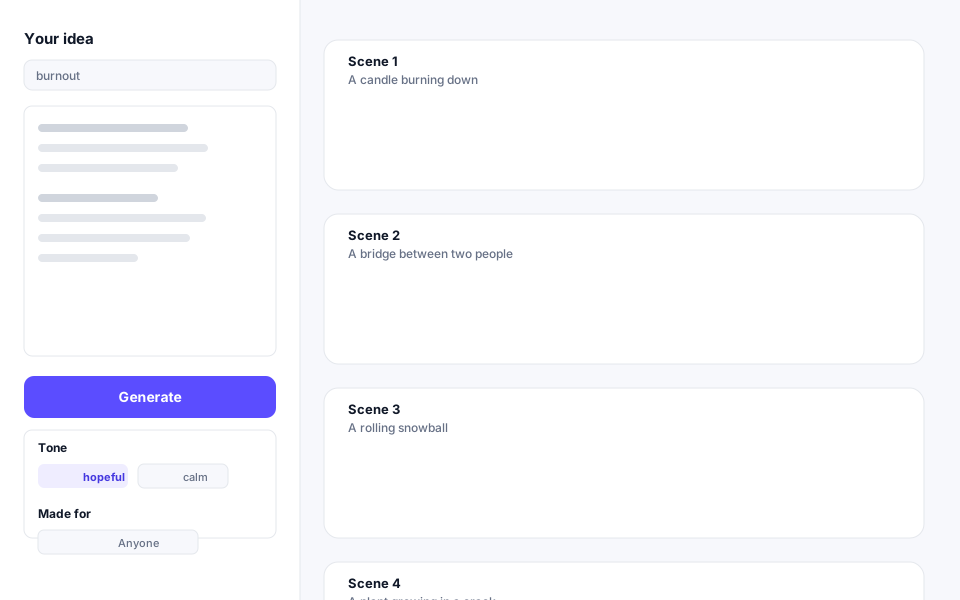
Short answer: The Visual Metaphor Generator turns an abstract idea such as burnout, compound interest or trust in a team into a simple picture that explains it. Type a concept, the AI plans four scenes and your browser draws them as flat illustrations from 27 built-in shapes. Free, no account, no trial, no paywall. Download as SVG or PNG.
Turn any abstract idea into clear visual metaphors, drawn instantly in your browser. Free, no sign-up. Download as SVG or PNG. The tool does not make photos or AI paintings, and it cannot tell you whether a metaphor suits your audience.
About this tool
The WizeTool Visual Metaphor Generator is a free, no-sign-up tool that turns an abstract idea into a simple picture that explains it. Type a concept and the AI plans four scenes, then your browser draws them as flat illustrations from 27 built-in shapes. You can pick from six colour palettes and download the result as an SVG (sharp at any size and editable) or as a PNG at 1600x1200.
How it works: the AI never writes code. It returns data — objects, sizes and positions — and your browser does the drawing. The concept text you type is sent to the server and to Cloudflare Workers AI, but WizeTool does not store it.
Limits: the tool produces flat illustrations only. Some concepts map better than others, so generate again if you want new options. It cannot know whether a metaphor suits your audience.
What it does
- Turns an abstract idea (burnout, compound interest, trust in a team) into a simple picture that explains it.
- Plans four scenes from one concept you type.
- Draws flat illustrations in your browser from 27 built-in shapes.
- Offers six colour palettes to choose from.
- Exports as SVG (sharp at any size, editable) or PNG at 1600x1200.
How to use it
- Open the Visual Metaphor Generator. It works on desktop and mobile and needs no account.
- Type a concept into the box — for example "burnout", "compound interest" or "trust in a team".
- Choose a colour palette from the six available, then generate.
- Download the scene you like as SVG or PNG, or generate again for new options.
What it can and can't do
Can:
- Turn an abstract idea into a flat illustration made from 27 built-in shapes.
- Plan four scenes from a single concept.
- Draw the picture in your browser from data the AI returns — it never writes code.
- Export at any size as an editable SVG, or as a 1600x1200 PNG.
Can't:
- Make photos or AI paintings. It draws flat illustrations only.
- Judge whether a metaphor suits your audience. That is your call.
- Guarantee that every concept maps well. Some concepts fit the shape set better than others.
Privacy
The concept text you type is sent to the server and to Cloudflare Workers AI so the scenes can be planned. WizeTool does not store it. See the Privacy Policy for details on what the site does collect.
Worked example
Imagine you need to explain "compound interest" to a reader who has never heard of it. You type "compound interest" into the generator and choose a palette. The AI plans four scenes — perhaps a small seed, a growing plant, a wider canopy and a large tree — and your browser draws each one as a flat illustration from the built-in shapes. You pick the clearest scene and download it as an SVG, ready to resize for a blog post, or as a PNG at 1600x1200 for a slide. If the first result is not quite right, generate again for a different set of options.
Frequently asked questions
Is the Visual Metaphor Generator free?
Yes. It is free to use, needs no account and has no trial or paywall.
Does it make AI photos or paintings?
No. It draws flat illustrations in your browser from 27 built-in shapes. It does not generate photos or AI paintings.
What does the AI actually do?
The AI plans four scenes from your concept and returns data — objects, sizes and positions. Your browser does the drawing. The AI never writes code.
Is my concept text stored?
The text you type is sent to the server and to Cloudflare Workers AI so the scenes can be planned. WizeTool does not store it. See the Privacy Policy for details.
Can it tell me if a metaphor suits my audience?
No. It can only produce pictures. Whether a metaphor works for your readers is something you have to judge yourself.
What if my concept does not produce a good result?
Some concepts map better than others. If the first four scenes are not useful, generate again for a new set of options.
Related guides
- What is GEO? — how AI search engines read and cite content, and what that means for the pages you publish.
- How to structure content so AI search engines can cite it — practical advice on making your writing easy for an AI to quote.
- How to get cited by AI search engines — the full checklist for being picked as a source.
- Website design trends for 2026 — covers crawlable content, AI interfaces and accessible motion, including how illustrations and visual aids fit on a modern site.
Ready to check your content?
Open the app to review your content and get clear, prioritized findings.