Review Snippet Structured Data: JSON-LD Guide
Want to add review snippet schema to your site? Google uses Review markup to show a star rating and review snippet next to a result for a book, product, film or other item, and Google's review snippet documentation details the properties it reads. Add the JSON-LD to the review page, preview it in the free Structured Data Preview tool, and verify it with the Rich Results Test.



What is Review Snippet structured data?
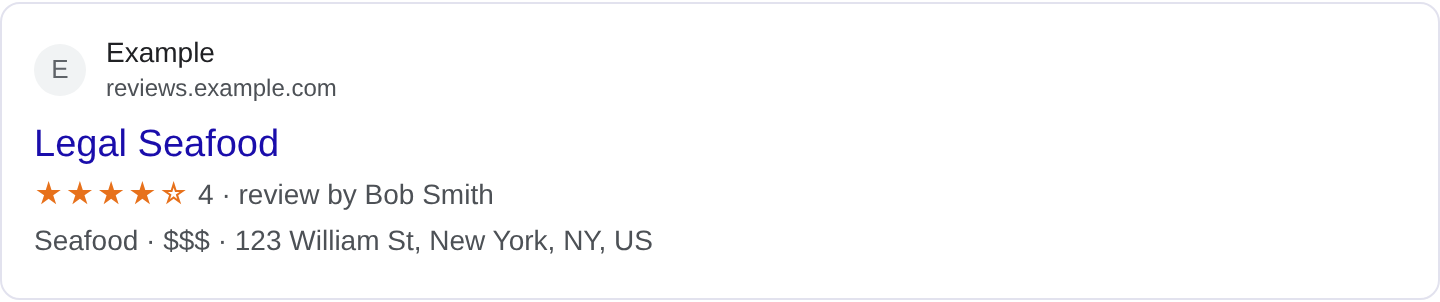
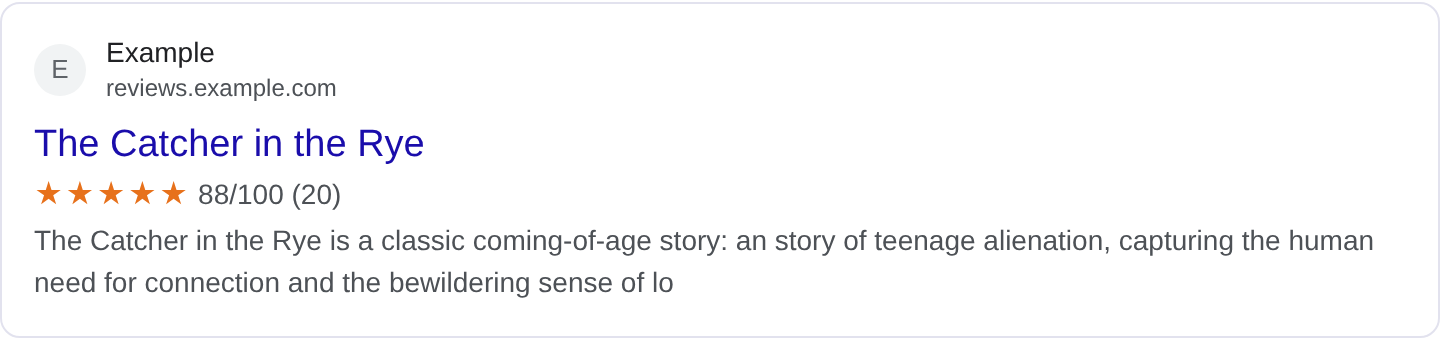
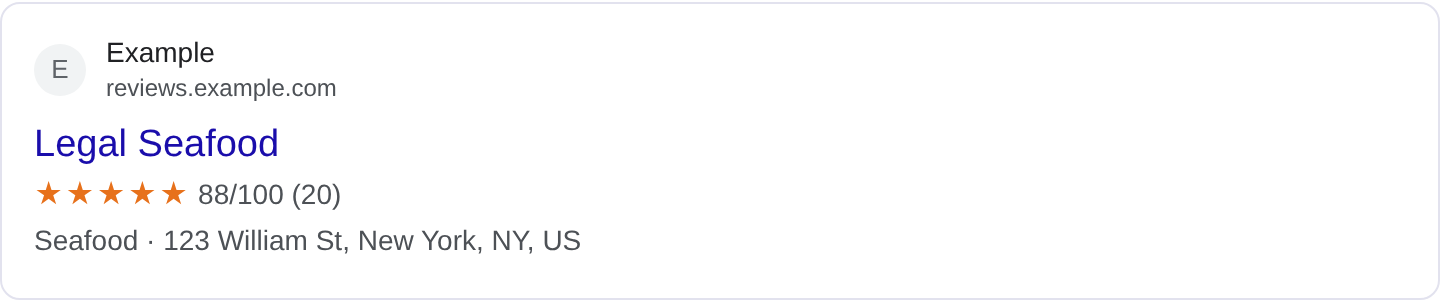
Review snippet markup describes a review of something so Google can show the star rating in the search result. When someone searches for a product, a book, a restaurant or a film, a page marked up as a review can show the rating next to the result, which is a strong visual cue. The stars and the score are what users scan for, and a review result with them tends to outclick a plain one. For the full list of properties and Google's current requirements, see Google's review snippet structured data documentation.
The Review type is the core. It carries itemReviewed (the thing being reviewed), reviewRating (a Rating with ratingValue and bestRating), author, datePublished and reviewBody. The itemReviewed is what makes the review valid: it must be a specific item, not a vague category. Google supports review snippets for a set of types like books, courses, events, movies, products, recipes, software apps and local businesses. Some review types, especially self-serving reviews of your own business, are not eligible for the star treatment, so know what you are marking up.
Review markup fits reviewers, critics, publishers and sites that write genuine reviews of specific items. It does not fit a product page that sells the item and also happens to show a score for itself, because self-serving reviews are excluded from review snippets. It also does not fit a general "top 10" roundup with no single reviewed item. Google wants a real review with a real author and a real rating, and it looks for signs that the review is editorial rather than promotional.
What it looks like in search results
A marked-up review can show a star rating and a short snippet in the result, sometimes with the reviewer's name and the date. The exact layout depends on the reviewed item type and the query. The real appearance may differ from any example, so check your page in the Rich Results Test and preview the fields with the Structured Data Preview tool.
JSON-LD example
{
  "@context": "https://schema.org",
  "@type": "Review",
  "itemReviewed": {
    "@type": "Book",
    "name": "The Salt Road",
    "author": {
      "@type": "Person",
      "name": "Iris Nakamura"
    }
  },
  "reviewRating": {
    "@type": "Rating",
    "ratingValue": "4",
    "bestRating": "5"
  },
  "author": {
    "@type": "Person",
    "name": "Jon Bell"
  },
  "datePublished": "2026-10-22",
  "reviewBody": "A slow, atmospheric novel that earns its length. The desert chapters are the best thing Nakamura has written."
}
itemReviewed identifies the book, film, product or place being reviewed, with enough detail to be unambiguous. reviewRating carries the score and the scale, author credits the reviewer, datePublished dates the review, and reviewBody is the actual review text. The review should be genuinely written, with a real opinion, not a star rating with no explanation.
Required and recommended properties
Google needs itemReviewed and reviewRating, plus author and reviewBody for a substantive review. Without a specific item, the rating floats free; without a body, the result has nothing to show but stars. The reviewRating must include ratingValue and bestRating so the scale is clear.
Recommended: datePublished, name for the review title, publisher if the review is from a publication, and author.url to link to the reviewer. Keep the rating consistent with the review body: a five-star rating attached to a lukewarm paragraph looks dishonest. If you aggregate many reviews, AggregateRating is the right type, not a single Review.
How to add Review Snippet markup to your page
1) Use the validator and select the Review type. 2) Fill in the item reviewed, the rating with scale, the author and the review text. 3) Fix errors the preview flags, often a missing item or a rating without a scale. 4) Paste the JSON-LD into the review page <head>. 5) Test the live URL in the Rich Results Test and confirm Google detects the Review.
Common mistakes to avoid
Self-serving reviews. Reviewing your own product or business with stars is not eligible for review snippets. Use reviews of others' work.
Missing scale. ratingValue without bestRating is ambiguous. Always state the scale.
Rating that contradicts the text. A one-star rating with a glowing paragraph looks like a mistake or a trick.
Vague item. "A great product" is not an itemReviewed. Name the specific book, film, app or place.
No review body. Stars alone are thin; a real review has substance.
Using Review for an aggregate score. If you are summarizing many reviews, use AggregateRating.
Fake reviews. Invented or paid reviews are a quality problem and can be penalized.
Outdated reviews presented as current. Date the review and update it if the item changes.
Frequently asked questions
Will every review get stars? No. Google only shows review snippets for supported item types and excludes self-serving reviews. Valid markup is required, not sufficient.
Can I review my own product? You can publish a review, but self-serving reviews are not eligible for the star treatment. Review others' work for that.
What item types are supported? Books, courses, events, movies, products, recipes, software apps and local businesses are common. Check the current list before relying on it.
Do I need an aggregate rating? Only if you are summarizing many reviews. A single review uses Review with reviewRating.
Related guides
Try it on your own content
The Structured Data Preview checks content against these practices in seconds. Free and no sign-up; see the tool page for how analysis works.