Q&A Page Structured Data: JSON-LD Guide
Want to add Q&A page schema to your site? Google uses QAPage markup to show a question with its best answer directly in results, and Google's Q&A page documentation details the properties it reads. Add the JSON-LD to the question page, preview it in the free Structured Data Preview tool, and verify it with the Rich Results Test.
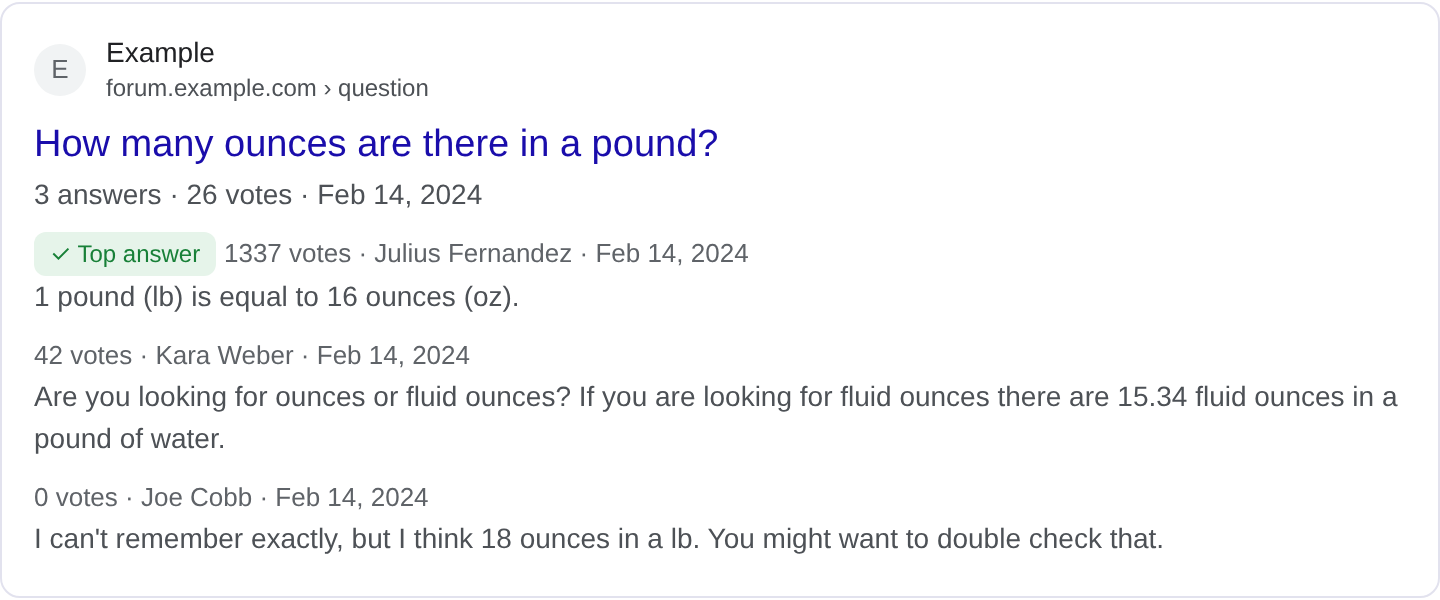
What is Q&A Page structured data?
Q&A Page markup describes a page built around a question with real answers from users. It is the markup behind the results that show a question with the best answer underneath, often with the number of answers. When someone searches a specific question, a marked-up Q&A page can surface the accepted answer directly, which saves the searcher a click. That is the value: the answer is the content, and the markup makes it visible. For the full list of properties and Google's current requirements, see Google's Q&A page structured data documentation.
The QAPage type is the core. Its main entity is a Question, which carries name, text, answerCount and a suggestedAnswer. The answer is an Answer with text, upvoteCount, url and sometimes an author. The key distinction is between a Q&A page and a forum: a Q&A page has a question and one or more answers, often with one accepted as correct, while a forum is a free-flowing conversation. DiscussionForumPosting is for the latter. Using the wrong type tells Google the wrong story.
Q&A markup fits support communities, developer help sites, and any page organized around a question with answers. It does not fit a general article that poses a rhetorical question, because there is no real answer with votes and acceptance. Google wants genuine user answers, and it looks for signs that the question was actually asked by a person and answered by others. Seeded or fabricated Q&A does not hold up.
What it looks like in search results
A marked-up Q&A page can show the question as the title and the top answer as a highlighted snippet, sometimes with the answer count. The exact layout varies by query and device, and Google often shows only the question and the best answer. The real appearance may differ from any example, so check your page in the Rich Results Test and preview the fields with the Structured Data Preview tool.
JSON-LD example
{
  "@context": "https://schema.org",
  "@type": "QAPage",
  "mainEntity": {
    "@type": "Question",
    "name": "How do I stop a Windows service from restarting on its own?",
    "text": "How do I stop a Windows service from restarting on its own?",
    "answerCount": 2,
    "upvoteCount": 26,
    "suggestedAnswer": {
      "@type": "Answer",
      "text": "Set the recovery options to 'Take No Action' in the service properties, then restart the service.",
      "upvoteCount": 18,
      "author": {
        "@type": "Person",
        "name": "svc_admin"
      }
    }
  }
}
mainEntity is the Question, with name and text holding the question and answerCount the number of answers. upvoteCount on the question shows how many people found it worth asking. suggestedAnswer holds the answer text, its upvoteCount, and an author. If there is an accepted answer, mark that one as the suggested answer. Keep the answer text consistent with what the page actually shows.
Required and recommended properties
Google needs a Question with name and at least one Answer with text. Without both, there is no Q&A to show. The question should be a real question, and the answers should be real user contributions. For the best result, include answerCount, upvoteCount and author so Google can judge quality and activity.
Recommended: suggestedAnswer to mark the best answer, dateCreated and dateModified on the question and answers, and author for each answer. Keep the vote counts real; inflated upvotes are a quality problem. If an answer is accepted, make sure the page visually indicates that too, so the markup and the page agree.
How to add Q&A Page markup to your page
1) Use the validator and select the QAPage type. 2) Fill in the question, answer count and the suggested answer with author and votes. 3) Fix errors the preview flags, often a missing answer or a malformed author. 4) Paste the JSON-LD into the question page <head>. 5) Test the live URL in the Rich Results Test and confirm Google detects the QAPage.
Common mistakes to avoid
Using QAPage for a discussion thread. A forum is DiscussionForumPosting; use QAPage only when there is a question with a clear answer.
Marking an unpopular answer as suggested. The suggested answer should be the best or accepted one, not a random reply.
Fake upvote counts. Inflated votes are easy to spot and undermine trust.
Answer that does not address the question. Google compares the answer to the question; a mismatched answer is a quality problem.
Question text that is a keyword string. "how to stop service restarting fix" is not a question. Write it naturally.
No visible answers on the page. The markup must match the page; markup for answers that are not shown is misleading.
Stale questions presented as current. Old Q&A can still be useful, but the page should not imply it is recent if it is not.
Copying Q&A from other sites. Scraped question-and-answer pairs look thin and can be penalized.
Frequently asked questions
What is the difference from a forum post? A Q&A page centers on a question with answers, often one accepted. A forum is a conversation. Pick based on how the page actually works.
Do I need an accepted answer? Not strictly, but marking the best answer as suggestedAnswer helps Google show the most useful response.
Can I mark up a support forum? Only the pages that function as Q&A. A pure discussion thread should use the forum type.
Does it help ranking? It can make the best answer surface directly for question queries, which improves visibility. It is not a direct ranking factor.
Related guides
Try it on your own content
The Structured Data Preview checks content against these practices in seconds. Free and no sign-up; see the tool page for how analysis works.