XML Sitemap Example and Format (Copy-Paste Template)
Short answer: An XML sitemap is a text file that lists the URLs you want search engines to crawl, one
<url>block per page, with a<loc>(the address) and optionally a<lastmod>(when it really changed). Save it assitemap.xmlat your site root, list only canonical pages that return 200, and submit it in Search Console.
People often ask what one actually looks like. Here it is.
A minimal valid sitemap
<?xml version="1.0" encoding="UTF-8"?>
<urlset xmlns="http://www.sitemaps.org/schemas/sitemap/0.9">
  <url>
    <loc>https://wizetool.com/</loc>
    <lastmod>2026-10-30</lastmod>
  </url>
  <url>
    <loc>https://wizetool.com/guides/on-page-seo-checklist/</loc>
    <lastmod>2026-10-28</lastmod>
  </url>
</urlset>
That's the whole format. Open yours in a browser at /sitemap.xml and you should see something very similar.
What each tag does
<urlset>wraps everything and declares the sitemap standard.<url>is one page.<loc>is the full address:https://, correct host, correct trailing slash. It must match the canonical URL.<lastmod>is the date the page's content last changed in a meaningful way. Update it only when it did. If every URL shows today's date every day, Google learns to ignore it.<changefreq>and<priority>appear in many old tutorials. Google has said it ignores them. Leave them out.
Rules worth remembering
- One sitemap file: up to 50,000 URLs or 50 MB uncompressed. Beyond that, split into several files and list them in a sitemap index.
- UTF-8 encoding, and special characters in URLs escaped (
&becomes&). - Absolute URLs only. No relative paths.
- Same host. A sitemap on
wizetool.comshould listwizetool.comURLs, notwwworhttpversions. - Only pages you want indexed. Skip redirects, 404s,
noindexpages and duplicate versions.
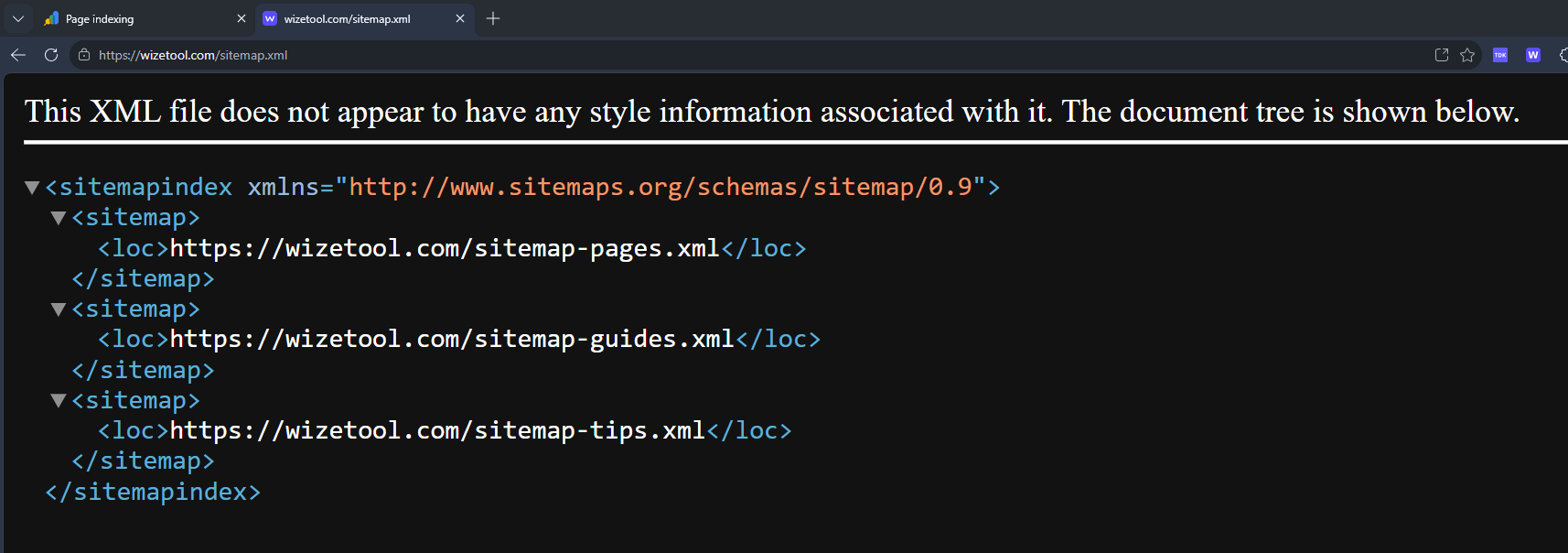
Sitemap index example
<?xml version="1.0" encoding="UTF-8"?>
<sitemapindex xmlns="http://www.sitemaps.org/schemas/sitemap/0.9">
  <sitemap><loc>https://wizetool.com/sitemap-guides.xml</loc></sitemap>
  <sitemap><loc>https://wizetool.com/sitemap-tools.xml</loc></sitemap>
</sitemapindex>
Handy for organising by section. It also makes the Search Console report easier to read, because you can see indexing per sitemap.
How to tell Google about it
- Add this line to
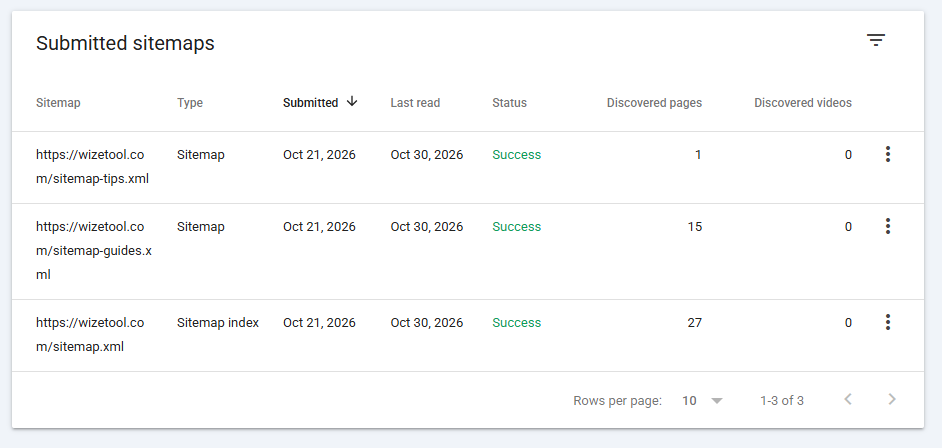
robots.txt:Sitemap: https://wizetool.com/sitemap.xml - In Search Console go to Sitemaps, enter the path, and press Submit.
- Check "Status". Success means Google could read it. It does not mean every page will be indexed.
Common mistakes
- Listing redirected URLs. If
/old/redirects to/new/, list only/new/. See how to set up 301 redirects. - Mixing http, https, www and non-www. This is a classic duplicate-content setup. Our guide on duplicate URLs and canonical tags explains the cleanup.
- Including
noindexpages. You're sending Google contradictory instructions. - Fake
lastmoddates. Honest dates build trust with crawlers. - Thinking a sitemap forces indexing. It doesn't. It helps discovery. Quality and links decide the rest. We cover the limits in XML sitemaps: what they do and do not do.
Quick checklist
- Opens at
/sitemap.xmland is valid XML - Only canonical, 200, indexable URLs
- Correct host and protocol everywhere
- Honest
lastmod - Referenced in
robots.txt - Submitted in Search Console
- Re-checked after big changes
FAQ
Do small sites need a sitemap? If your internal linking is good and the site is small, Google can find pages without one. It's still cheap insurance for a new site, and it gives you indexing reports.
Can I generate it automatically? Yes. Most CMSs and static site generators do. If a plugin is generating it, still open the file and read it. Generated doesn't mean correct.
Where should it live? At the root (/sitemap.xml) is simplest. A sitemap can only list URLs at or below its own path unless submitted through Search Console for that property.
What about image or video sitemaps? They're extra extensions for media-heavy sites. Start with a plain one.
Related guides
- XML sitemaps: what they do and do not do
- How to read the Search Console pages report
- On-page SEO checklist
- Find broken URLs in your list with the dead link checker
Sources
- Sitemaps.org protocol — the XML schema, tag definitions, size limits and index-file rules.
- Google Search Central: build and submit a sitemap — how to create, validate and submit one.