How to Set Up a 301 Redirect (Apache, Nginx, Cloudflare)
Short answer: A 301 redirect tells browsers and search engines that a page has moved for good. Add one rule on your server (or in your host's redirect file) that sends the old URL to the new one, then test it with
curl -I. Use a single hop, point to the final URL, and keep the rule for at least a year.
If you're still deciding between 301 and 302, read 301 vs 302 redirects explained first. This page is the practical part: the actual lines to paste.
When a 301 is the right call
Use a 301 when the old URL is not coming back. Typical cases:
- You changed a URL slug or restructured folders.
- You moved from
httptohttps, or fromwwwto the bare domain. - You merged two pages into one.
- You deleted a page that has a close replacement.
If the move is temporary (maintenance, an A/B test), use a 302 instead. If a page is gone and has no replacement, a 404 or 410 is more honest than redirecting everything to the homepage.
Apache (.htaccess)
For one page:
Redirect 301 /old-page/ https://wizetool.com/new-page/
For http to https plus www to non-www in one hop:
RewriteEngine On
RewriteCond %{HTTPS} off [OR]
RewriteCond %{HTTP_HOST} ^www\. [NC]
RewriteRule ^ https://wizetool.com%{REQUEST_URI} [L,R=301]
Swap in your own domain. Put it above other rewrite rules, or it may never run.
Nginx
# one page
location = /old-page/ {
    return 301 /new-page/;
}

# whole host (www to non-www)
server {
    listen 80;
    listen 443 ssl;
    server_name www.wizetool.com;
    return 301 https://wizetool.com$request_uri;
}
Reload with nginx -s reload after testing the config (nginx -t).
Cloudflare Pages or Netlify (_redirects file)
Create a plain-text file named _redirects in your published folder:
/old-page/  /new-page/  301
/blog/*     /guides/:splat  301
The first line moves one page. The second moves a whole folder and keeps the rest of the path. Host-level rules (www to non-www) are usually set in the dashboard instead, so check your provider's redirect settings.
WordPress
A redirect plugin is fine for a handful of URLs. For hundreds, server rules are faster. Whichever you choose, don't stack a plugin and a server rule for the same URL. That's how loops start.
Test it (30 seconds)
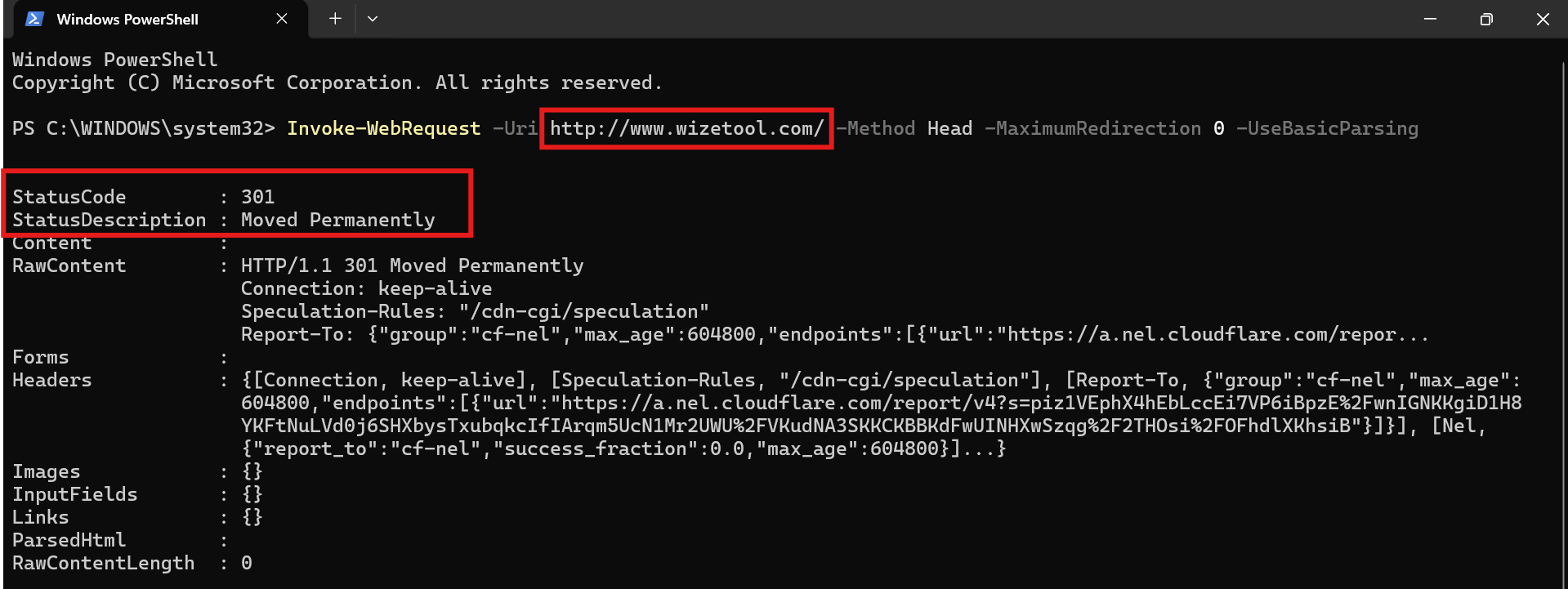
curl -I http://wizetool.com/old-page/
You want to see HTTP/1.1 301 Moved Permanently and a location: header with the final URL. Then run curl -I on that final URL and confirm it returns 200. If it returns another 301, you've built a chain.
Mistakes that cost people rankings
- Redirect chains. A to B to C. Point A straight at C. Google follows a limited number of hops, and every hop slows users down.
- Redirect loops. A to B and B back to A. The page never loads.
- Everything to the homepage. Search engines can treat irrelevant mass redirects like soft 404s. Redirect to the closest equivalent page.
- Forgetting internal links. After redirecting, update your own links to the new URL. Your broken links report will thank you.
- Removing the rule too soon. Google suggests keeping permanent redirects for at least a year (check the current wording in the docs below).
- Leaving the old URL in the sitemap. Your sitemap should list only final URLs. See XML sitemaps: what they do and don't do.
Will a 301 hurt my rankings?
A clean 301 to an equivalent page normally passes the old page's signals to the new one. Google has said that redirects don't lose PageRank. You may still see a short wobble in rankings while Google reprocesses the change. A sloppy migration (chains, irrelevant targets, missing redirects) is what causes real losses.
Quick checklist
- Old URL returns 301 with one hop
- Final URL returns 200
- Target page is a close match to the old one
- Internal links and sitemap updated
- Canonical tag on the new page points to itself
- Redirect kept for 12+ months
- Search Console checked after a week
FAQ
Is a 301 the same as a 308? Both are permanent. A 308 additionally requires the request method (like POST) to stay the same. For normal page moves, 301 is fine.
Do I need to tell Google? No. It finds redirects while crawling. Request indexing for the new URL in Search Console if you want it picked up sooner. Don't use the Removals tool for redirected pages.
How long until Google updates? Often days to a few weeks, depending on how often the page is crawled.
Can I redirect to another domain? Yes. For a full site move, Google has a dedicated "change of address" process in Search Console. Read the docs first.
Related guides
- 301 vs 302 redirects explained
- How to fix duplicate URLs and canonical issues
- How to find and fix broken links
- Check your own site with the dead link checker
Sources
- Google Search Central: redirects and Google Search — how Google handles 301s and why permanent redirects are preferred.
- RFC 9110, HTTP Semantics, section 7: Status Codes — the definition of 301 Moved Permanently and the other 3xx codes.